
Campaign Manager 360
AdSync's deepest integration — full object coverage with real-time bi-directional sync.
Trafficking
Reporting
Bring your campaign setup into one workflow. AdSync maps creatives with AI, runs campaign QA, and helps you review and publish to CM360, Google Ads, and Meta — with reporting that includes GA4.
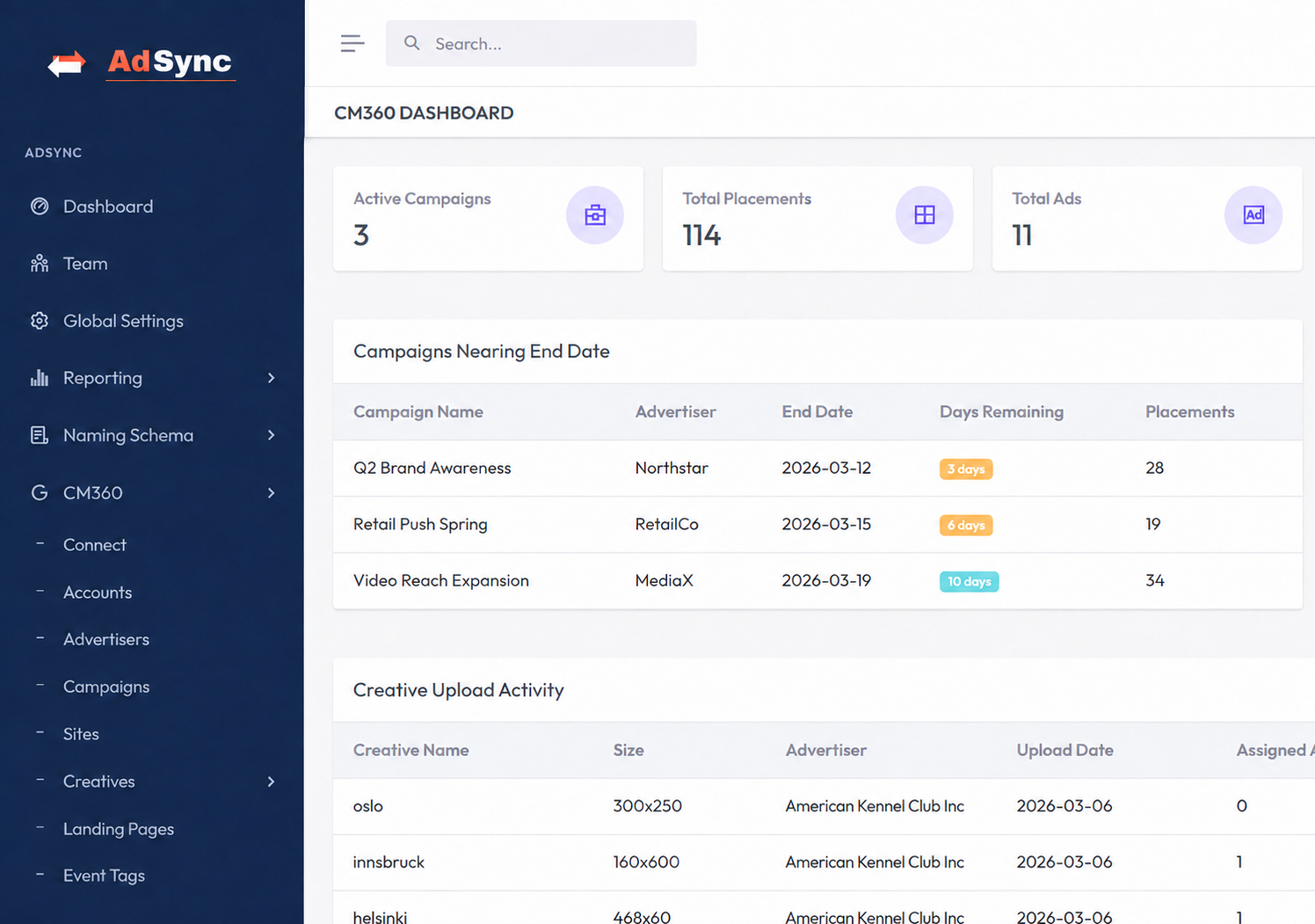
The hero shows what AdSync does. This is what your team actually works in — campaigns, placements, ad counts and creative status, read live from the connected platform.

More screens on the full walkthrough — or book a demo to see it on your own campaigns.
The same trafficking and reporting engine runs across your ad stack — CM360 at full depth, Google Ads and Meta alongside it, GA4 analytics built in.
AdSync's deepest integration — full object coverage with real-time bi-directional sync.

Build, validate, and push campaigns — then track delivery without leaving AdSync.

Traffic Meta campaigns with the same AI creative mapping and QA rigor as everywhere else.

Sessions and conversions blended into every dashboard, right next to delivery data.
AdSync connects to your ad platforms — with CM360 as its deepest integration — and brings repetitive campaign setup into one workflow.
Drag and drop your spreadsheet. AdSync parses placements, ads, and hierarchical relationships automatically — no formatting required.
Pattern recognition matches your creative assets to the right ads and placements based on naming conventions and metadata. Zero manual mapping.
Campaign validation checks scan for misconfigurations, broken links, missing creatives, and naming violations — all before a single push goes out.
One click pushes the fully structured, validated campaign to CM360 — AdSync's flagship integration — or to Google Ads and Meta. Properly named, correctly linked, and ready to go live.
AdSync replaces four separate workflows with one intelligent platform built specifically for paid media teams.
AdSync reads your trafficking sheets and automatically builds ads, placements, and creatives. No copy-pasting, no manual steps.
Every campaign passes through automated campaign QA checks — flagging misconfigurations, broken links, and creative mismatches before launch.
Connect CM360, Google Ads, and Meta Ads through secure OAuth. Real-time bi-directional sync keeps campaigns, placements, ads, creatives, and reports accurate everywhere.
Live dashboards surface how every campaign is performing, while proactive alerts catch expiring campaigns, broken tags, and delivery anomalies before they impact performance.
AdSync pulls live delivery data straight from CM360, Google Ads, and Meta — and blends in GA4 analytics — so you can track performance across every campaign and platform, without switching tools or exporting a thing.
AdSync's AI lets traffickers describe what needs to happen in plain English — the system handles the execution, from a single ad to every object in the campaign.
Explore AI Features| Task | Without AdSync | With AdSync AI |
|---|---|---|
| Extend flight dates | Open each placement → find date field → update one by one | Extend all flights in Campaign X by 2 weeks |
| Find missing creatives | Manually cross-check each placement against creative list | Which placements have no creatives assigned? |
| Pause underperforming ads | Pull report → identify → pause one by one | Pause all ads with no impressions in 7 days |
| Duplicate a campaign | Recreate entire structure manually in CM360 | Duplicate Campaign X and shift dates by 30 days |
AdSync isn't a generic ad tool with platforms bolted on. It's architected around CM360's full object model — and that same trafficking and reporting engine now runs on Google Ads and Meta Ads, with GA4 feeding analytics into every dashboard. Every connection uses secure OAuth.
Sites · Landing pages · Event tags · Floodlight · Placement groups
The same engine, every platform